In honor of Thomas Paine and other Founders & Immigrants. In memory of my daddy Horst Bingel and my mom Irma Bingel
Tuesday, December 17, 2024
Typed Python in 2024, 10 years after introduction: Well adopted, yet usability challenges persist
Tuesday, November 19, 2024
Google search result inconsistencies due to AI
Here is a beautiful example of such an inconsistency!
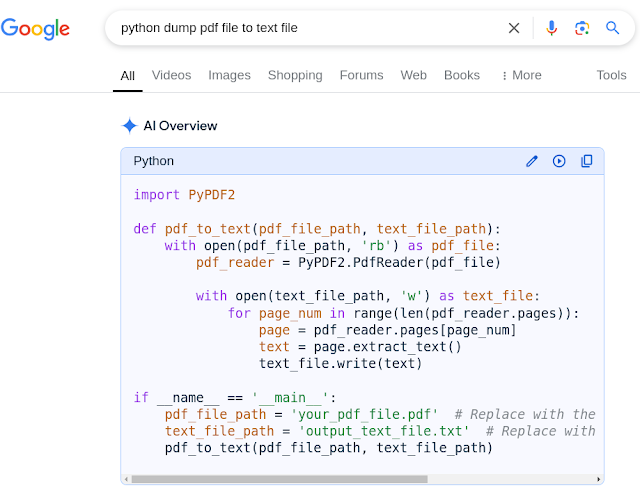
My first Google search result
- When I first queried about how to use Python to export a PDF file as a text file, Google AI generated a code example using import PyPDF2
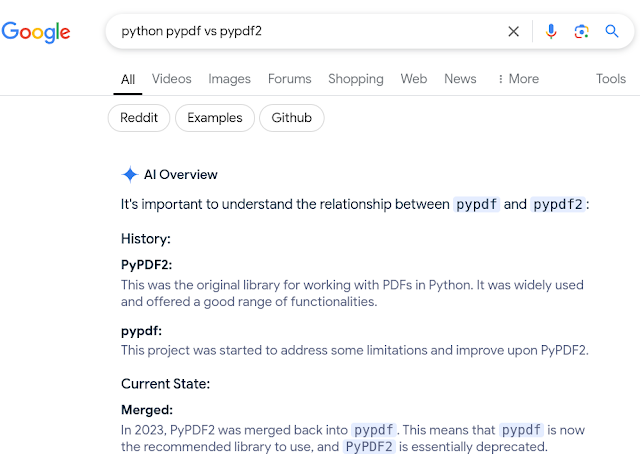
- Since I knew there was also a library called pypdf, I was curious what the difference was.
Well Google AI then declared that PyPDF2 was actually deprecated and merged into pypdf.
Sunday, October 06, 2024
Google search provides now generated AI for software coding
It is a great new feature provided by Google search.
I have used and learnt from it for my own Python programming a number of times. Often the tips are quite good for a non expert like me.
However, following is an obviously disappointing example I was shown yesterday.
What is missing or even wrong?
- Importing IntEnum, unique instead of Enum
- Decorating the class with @unique
- The Color class should have been derived/subclassed from IntEnum instead of Enum
- The method chosen is an instance method. It should be a @classmethod
Thursday, October 03, 2024
Python serious number handling annoyances
It is very strange and weird that Python is not capable out of the box to properly determine if an arbitrary value (a variable) is numeric, an integer, or a float!!!
Perhaps, there are other widely used and recognized packages (I strongly suspect e.g. NumPy) available to do that for you, but I think such fundamental functions should be part of the core of Python.
str(value).isnumeric() does not work properly when the value is a float. It returns false. It appears to work reliably only if the len(str(value)) = 1. What a joke! This is absolutely insane and unexpected!!!
isinstance(value, int) or isinstance(value, float) are similarly unreliable depending on whether the value is a string or not. I also tried int(str(value)) and float(str(value)).
isinstance(value, float) returns true when the value is clearly and typed (using the int() function) as an integer. This is absolutely insane and unexpected!!!!
isinstance(v, numbers.Number) also fails when the value is a str(value) even if the value is an integer, i.e. int(value) or a float, i.e. float(value). This is absolutely insane and unexpected!!!!
math.isnan(v) does not work with str(value) either! This is absolutely insane and unexpected!!!!
int(value) converts a float or a str(float) into an integer when the float decimals are less than .01. This is absolutely insane and unexpected!!!!
I found that str(value).isalpha() appears to work most reliably to determine that the value is a number and it does not crash!
Unlike str(value).isalnum() fails if the value is an clearly an single digit integer and nothing but an integer! It returns False if the value is a float, which is expected. The flaw here is that one character is enough for this function according to the documentation, while you would expect a minimum length requirement of two characters. This is absolutely insane and unexpected!!!!
In the end, I had to write my own functions to handle this ambiguity!
P.S. I probably wasted at least several hours to understand this issue and develop more reliable functions on my own! What a waste!
Caveat: I am not an expert in Python development.
Thursday, September 26, 2024
Python enum annoyances
I find it very strange that Python does not have a separate type for enum like set, tuple, or list (e.g. dataclasses are another kludge of this language).
To my surprise, I had to learn the hard way that Python enums are sensitive to the order of parent classes, when you use inheritance. This does not make any sense to me that the order of base classes matters.
I am using the PyCharm Community Edition IDE (version 2024.1.6 Build #PC-241.19072.16, built on August 8, 2024) and and Python version 3.12.
Caveat: I am not an expert Python developer
Anyway, today I wasted probably at least an hour to figure out following, to me cryptic error message from deep within Python:
"class Dummy2(StrEnum, DummyBase): File "/usr/lib64/python3.12/enum.py", line 606, in __new__ raise exc.with_traceback(tb)
File "/usr/lib64/python3.12/enum.py", line 596, in __new__
enum_class = super().__new__(metacls, cls, bases, classdict, **kwds)
TypeError: Cannot create a consistent method resolution order (MRO) for bases StrEnum, DummyBase"
Here is my compacted, simplified replication code for this error:
import os
from enum import StrEnum, unique
@unique
class DummyBase(StrEnum):
@classmethod
def dummy_method(cls):
return 'Here is a dummy'
@unique
class Dummy1(DummyBase, StrEnum):
M1 = 'Member1'
M2 = 'Member2'
@unique
class Dummy2(StrEnum, DummyBase):
M1 = 'Member1'
M2 = 'Member2'
def run():
os.system('clear')
print(Dummy1.dummy_method())
print(Dummy2.dummy_method())
Conclusion: Dummy1 works fine, but Dummy2 crashes! Grrr!
Google AI search also confirms that you can use inheritance on enums (see last sentence):
Wednesday, September 25, 2024
Python dataclass annoyances
Apparently, it is not possible to inherit from an non-frozen class if you declare the derived class as frozen. That is weird and defeats the purpose!
At least the PyCharm Community Edition IDE flags it and would not allow it. Message: "Frozen dataclasses can not inherit non-frozen one and vice versa"
Why is the frozen option apparently not available at the field level?
It appears you can not use e.g. the __post_init__ to freeze the instance. Really bad. It seems you can also not use the typing.Final in the __post_init__.
Caveat: I am not an expert Python developer.
Monday, June 24, 2024
PyCharm Community Edition annoyances with respect to Python
I recently started to use PyCharm instead of Visual Studio Code for my Python programming.
This CE of PyCharm has its shortcomings!
My project consists of two main sub folders and each mein sub folder has sub folders as well.
Here are my annoyances (will be amended as needed):
- I noticed that if I use the same file names (.py) across sub folders (even in different branches of folders), PyCharm would raise a module not found error. Only after I renamed the file it worked again.
- Frequently, I have to restart PyCharm because it hangs/freezes and become unresponsive. Maybe that is why the main menu has an option "Repair IDE"?
- Every time I execute code, I get the same error message "TERM environment variable not set." without any hint what to do about it. This particular error seems to be negligible as the code executes otherwise fine.
Monday, June 17, 2024
Comparing the PyCharm Community Edition to Visual Studio Code for Python programming
I have almost pulled out all my hairs using VSC for Python programming. So many things went wrong and often unexpectedly. My frustration got to the point to give up!
Situation: I program only for personal use on my laptop computer with Fedora Linux as the operating system and SQLite as my database application.
Then, it dawned on me perhaps this is not an not issues with the Python language, but with the IDE. Well, I just installed the PyCharm community edition. I have never before really used PyCharm.
The difference was like day and night! Indeed, VSC sucks when it comes to Python programming. The biggest issue I encountered was that if your packages were in different folder branches, VSC would fail to properly import local py files. I tried so many things to make the imports work, but to no avail. I probably wasted more than 24 hours total trying to fix these kind of issues.
Once I got busy in PyCharm basically all the issues I encountered with VSC went away with a few tiny corrections of my code (partially these lines of code were introduced trying to deal with the VSC failures). Within less than two hours my code was again running as it should be. 😊
The many charms of the PyCharm IDE compared to VSC:
- You can mark a folder as source code folder
- Many of the hints are much better and more helpful
- The error messages in the console were more concise, on target and thus more helpful to quickly identify the issue
- Integration with Github seems to be a lot easier and more convenient
- I am sure I forgot some other benefits I encountered
Saturday, April 08, 2023
MIT Turbocharges Python’s Notoriously Slow Compiler
Tuesday, March 21, 2023
Python 3.12: A Game-Changer in Performance and Efficiency
Friday, February 17, 2023
NumFOCUS DISCOVER Cookbook (Diverse & Inclusive Spaces and Conferences: Overall Vision and Essential Resources)
Tuesday, May 24, 2022
Someone built a programmed wifi-equipped water gun to shoot the pigeons on his balcony
Wednesday, May 04, 2022
PyScript: A New Framework From Anaconda That Allows Users To Create Rich Python Applications In The Browser Using HTML’s Interface
Tuesday, April 19, 2022
Automate checking for flaws in Python with Thoth
Thursday, July 29, 2021
OpenAI: Introducing Triton: Open-Source GPU Programming for Neural Networks
Sunday, April 25, 2021
Python Annoyances
I have started programming in Python only very recently! More annoyances will be added as I gain more experience with this language.
- Lack of constants!
- del listname[index] to remove an item from a list at a certain position! This is very awkward and not intuitive!
- The abundance of packages is overwhelming
- The rstrip() function removes one to many characters on the left hand side of the argument of the rstrip function. Therefore, they came up with the removesuffix() function, introduced with Python version 3.9 (see e.g. PEP 616 -- String methods to remove prefixes and suffixes dated 3/19/2020). This is almost to clever by half instead of fixing the rstrip() function by e.g. adding an optional parameter! (added 6/15/2021)
- Despite hundreds of standard libraries, there is no built in function to copy and paste from the clipboard. So I installed Pyperclip, but resulted in errors, when I tried to used it. I had to resort to an old Unix command and subprocess to copy/paste from the clipboard.
Tuesday, August 04, 2020
Tuesday, February 25, 2020
SciPy 1.0: fundamental algorithms for scientific computing in Python
SciPy 1.0: fundamental algorithms for scientific computing in Python | Nature Methods: SciPy is an open-source scientific computing library for the Python programming language. Since its initial release in 2001, SciPy has become a de facto standard for leveraging scientific algorithms in Python, with over 600 unique code contributors, thousands of dependent packages, over 100,000 dependent repositories and millions of downloads per year. In this work, we provide an overview of the capabilities and development practices of SciPy 1.0 and highlight some recent technical developments. This Perspective describes the development and capabilities of SciPy 1.0, an open source scientific computing library for the Python programming language.